
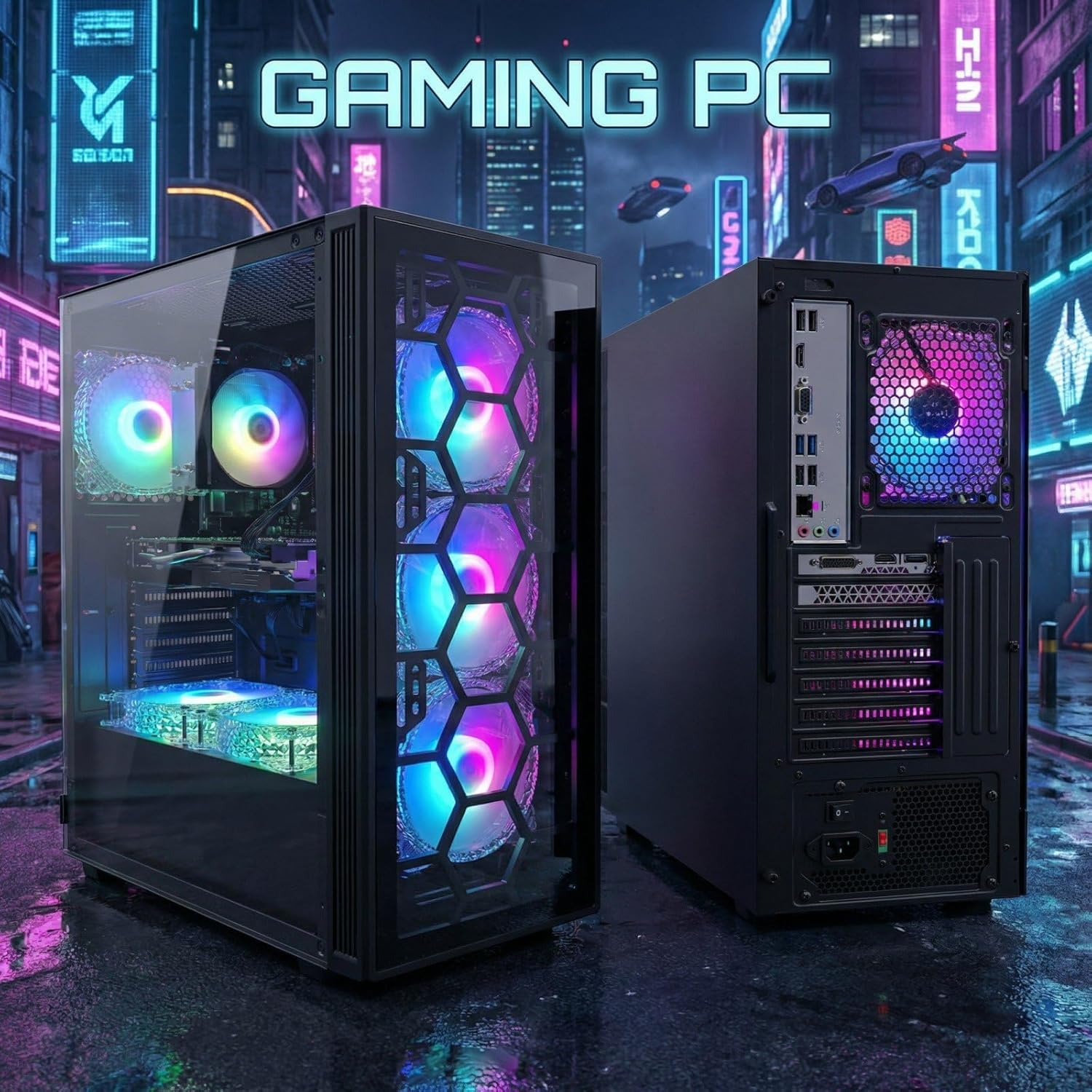
STGAubron Gaming PC Desktop: A Closer Look at What This Pre-Built Rig Has to Offer
If you’ve been shopping for a pre-built gaming desktop without the headache of sourcing individual components, waiting on shipments, and assembling everything yourself, you’ve likely come across machines in the mid-range segment that promise a lot but deliver inconsistently. The STGAubron Gaming PC Desktop is one of those options that tends to appear fairly regularly in search results and Amazon listings for this category — and for good reason. Packing an Intel Core i7, NVIDIA GeForce RTX 3050 6G, 32GB of RAM, a 1TB SSD, WiFi 6, Bluetooth 5.0, and a full installation of Windows 11 Home right out of the box, it presents an interesting value proposition for anyone looking to enter PC gaming or upgrade from an older system.
This article isn’t a product review in the traditional sense — it’s an informational breakdown meant to help you understand what this machine is, how it works, and whether it might fit your situation. No inflated claims, no fake endorsements. Just a practical look at what you’re getting and what to keep in mind before making a decision.
Key Features Worth Understanding
Intel Core i7 Processor (Up to 3.9GHz)
The Intel Core i7 processor is the backbone of this build. Clocking up to 3.9GHz, it sits comfortably in the upper-mid tier of desktop CPU performance. For the majority of gaming workloads, productivity applications, and everyday multitasking, this chip handles things smoothly. It’s worth noting that the specific generation of the i7 matters — different generations of the same “i7” branding can vary significantly in performance — but at clock speeds up to 3.9GHz, it offers enough headroom for demanding applications to run without visible bottlenecks in most day-to-day scenarios.
NVIDIA GeForce RTX 3050 6G
The GPU is usually the defining factor in any gaming PC conversation, and the RTX 3050 6G is an interesting choice. The RTX 30-series cards from NVIDIA brought real-time ray tracing to a broader audience, and the 3050 is the entry-level expression of that generation. With 6GB of dedicated VRAM, it can handle 1080p gaming across a wide range of titles, including many popular multiplayer games, open-world RPGs, and esports titles. For someone coming from integrated graphics or an older dedicated GPU from 5 to 7 years ago, this card will likely feel like a significant upgrade.
That said, 6GB of VRAM does have limits. At higher resolutions (1440p or 4K) or in very texture-heavy titles, this card may struggle to maintain consistently high frame rates at maximum settings. At 1080p with medium to high settings, however, it performs reasonably well across a broad library of titles.
32GB of RAM
This is one of the more generous specifications in a pre-built at this price tier. 32GB of system RAM means you’re well covered for gaming, browser multitasking, streaming your own gameplay, running background applications, and even light creative workloads like video editing or music production. Most games in 2025 and beyond are optimized for 16GB, meaning 32GB gives you considerable headroom. For users who tend to keep many browser tabs, Discord, streaming software, and games open simultaneously, the extra RAM headroom is a meaningful quality-of-life upgrade.
1TB SSD Storage
The shift from HDDs to SSDs as primary storage has been one of the most impactful changes in modern computing, and this machine ships with a 1TB solid-state drive. This means faster boot times, quicker game load screens, and snappier application launches across the board. 1TB is a solid amount of space — you can comfortably hold the operating system, several large AAA games (many of which run 50–100GB each), productivity software, and personal files without constantly managing storage.
For users with large existing game libraries or media collections, external storage or a secondary drive may eventually become useful, but as a starting point, 1TB is a practical baseline.
WiFi 6 and Bluetooth 5.0
Wireless connectivity is often an afterthought in desktop listings, but it genuinely matters. WiFi 6 (also known as 802.11ax) offers faster speeds, lower latency, and better performance in environments with multiple devices on the same network compared to the older WiFi 5 standard. For online gaming, this translates to more stable connections and reduced ping in wireless setups. For households with many smart devices, smart TVs, phones, and tablets all competing for bandwidth, WiFi 6 handles congestion better.
Bluetooth 5.0 handles wireless peripherals — headsets, controllers, keyboards, mice — with improved range and connection stability compared to older Bluetooth versions. If you’re building a wireless desk setup or want to connect a controller without a dongle, this is a welcome inclusion.
Six RGB Case Fans
Aesthetics in gaming setups have become part of the culture, and the six RGB fans included in this system serve a dual purpose: they contribute to active airflow across the case, and they add the kind of visual flair that many gamers look for in a desktop build. RGB lighting is customizable on most systems, meaning you can set colors and patterns to match your room’s setup. While this isn’t a critical feature from a performance standpoint, it does suggest the case has been designed with adequate cooling infrastructure in mind, which matters for thermal management during extended gaming sessions.
Windows 11 Home
The system ships with Windows 11 Home pre-installed, meaning there’s no need to purchase or activate an operating system separately. Windows 11 brings a modernized interface, improved DirectX 12 support, Auto HDR features for compatible displays, and the DirectStorage API — which is designed to reduce load times in games optimized for it. It also supports Xbox Game Pass integration, which is useful for anyone interested in accessing a library of games via subscription.
How This PC Can Be Used
As a Primary Gaming Desktop
The most obvious use case is as a dedicated gaming machine for someone who has been gaming on a console or laptop and is ready to move to a desktop setup. At 1080p, this PC handles most mainstream game genres without issue — first-person shooters, role-playing games, strategy titles, online battle royale games, and sports simulators. For someone not chasing ultra-high refresh rates at 1440p or higher, this setup is a functional and capable gaming hub.
As a Dual-Purpose Work and Gaming Machine
Given the 32GB of RAM and i7 processor, this machine doesn’t have to live exclusively in gaming territory. It can function as a capable workstation for remote workers, students, or freelancers who also want to game after hours. Spreadsheets, presentations, video calls, and light photo editing all run without complaint on this hardware. The 1TB SSD ensures applications launch quickly and workflows stay responsive.
As a Home Entertainment Center
Connected to a larger monitor or even a television, this PC can serve as a living room media hub. Streaming high-quality video content, browsing the web, playing games, and managing digital media are all within scope. WiFi 6 connectivity means you don’t need to run ethernet cables across the room.
For Light Content Creation
While this machine isn’t purpose-built for heavy video editing or 3D rendering, it’s capable of handling lighter creative workflows. Video editing in tools like DaVinci Resolve or Adobe Premiere at 1080p resolution, photo editing in Lightroom or Photoshop, and recording gameplay footage are all feasible on this hardware configuration.
Who Might Find This Setup Suitable
Console-to-PC switchers: Players who have spent years gaming on consoles and are ready to explore PC gaming for the first time will find this machine a functional starting point. It eliminates the complexity of building from scratch while delivering a noticeably different gaming experience.
Students or young adults setting up their first desktop: For someone heading into college or moving into their own space, a machine that handles both school responsibilities and entertainment in a single package has practical appeal.
Casual to mid-level PC gamers: Those who game regularly but aren’t chasing the absolute highest visual fidelity at every moment — people who play at 1080p, enjoy a broad library of titles, and don’t need 4K ray tracing — will likely find this specification level comfortable.
Remote workers who also game: The 32GB RAM and fast SSD make this machine genuinely useful for productivity, not just play. Someone who needs a capable work machine and doesn’t want to compromise gaming ability might find this configuration hits both marks adequately.
Those who prefer a ready-to-use system: Not everyone enjoys the process of building a PC from scratch. Pre-built desktops like this one offer the convenience of a plug-and-play setup with warranty coverage, which appeals to buyers who value time and simplicity over customization depth.
Important Things to Consider Before Purchasing
Monitor not included: Like most desktop PCs, this system doesn’t come with a display. You’ll need a separate monitor, and the quality of that display will significantly affect your experience. For gaming, a 1080p monitor with a high refresh rate (144Hz or higher) tends to pair well with a mid-range GPU like the RTX 3050.
GPU generation context: The RTX 3050 is part of NVIDIA’s 30-series lineup, which is a generation behind the more recent 40-series cards. For buyers planning to use this machine for several years, it’s worth understanding that newer titles may place higher demands on GPU resources over time. That said, the 30-series remains capable for most current gaming needs, particularly at 1080p.
No optical drive: Pre-built systems at this tier rarely include optical drives, and this one appears to follow that trend. If you have legacy optical media or rely on physical disc installations, you’ll want an external USB DVD or Blu-ray drive.
Upgradeability: One practical advantage of a desktop over a laptop is the potential to upgrade components over time. While this machine ships ready to use, understanding whether the case allows for GPU upgrades, RAM expansion, or additional storage down the road is a question worth investigating in the product specifications or seller details.
Peripheral requirements: A keyboard, mouse, and speakers or headset are not included. Budget for these if you don’t already own compatible peripherals.
Power supply adequacy: Pre-built systems vary in PSU quality and wattage. For a system running an RTX 3050 and an i7, verifying the wattage and brand of the included power supply is a reasonable step if you’re considering future upgrades that might draw more power.
Pre-Built vs. Custom-Built Desktops: Understanding the Trade-offs
The debate between buying a pre-built desktop and assembling one yourself is a perennial one in PC gaming circles, and it’s worth addressing in a balanced way.
Pre-built desktops like the STGAubron offer clear advantages in terms of convenience. They arrive assembled, tested, and ready to use. They often come with some form of warranty and customer support. For first-time PC buyers, they remove the learning curve associated with component selection and assembly.
The trade-off is typically in value per dollar. Component costs in custom builds can sometimes offer better raw specifications for the same budget, since you’re not paying for labor, case branding, or pre-installed software bundles. However, this gap has narrowed considerably in recent years as supply chains have stabilized and pre-built pricing has become more competitive.
Custom-built desktops reward those who enjoy the process, want specific components, or need particular upgrade paths. They offer control over every detail — from the motherboard chipset to the PSU brand to the case airflow design. The downside is the time investment, the need for some technical knowledge, and the absence of consolidated warranty coverage.
For buyers who simply want a capable gaming machine without the research burden, a well-specced pre-built is a practical choice. For buyers who enjoy the hardware side of computing and want maximum flexibility, a custom build might serve better.
There’s no universally correct answer. The right choice depends on your time, technical comfort level, and what the overall experience of owning and using the machine means to you.
Frequently Asked Questions
Can this PC run modern games at 1080p? For the majority of current titles at 1080p resolution, yes. The RTX 3050 6G is capable of handling a wide library of games at medium to high settings. Competitive games with less demanding graphics (like Valorant, CS2, or Fortnite) will run comfortably at high frame rates. More graphically intensive titles may require adjusting settings to balance visual quality with performance.
Is 32GB of RAM necessary for gaming? Most games are designed with 16GB as the target, so 32GB provides ample headroom beyond standard gaming needs. Where the extra RAM genuinely helps is in multitasking — streaming gameplay, running multiple browser tabs, using voice chat software, and gaming simultaneously all benefit from the additional memory. It also future-proofs the system somewhat.
Does it support dual monitors? That depends on the output ports available on the GPU and the system’s I/O panel. Most RTX 3050 cards support multiple display outputs (typically DisplayPort and HDMI), so dual-monitor setups are generally possible. Reviewing the specific port configuration in the product listing or manufacturer documentation is advisable.
Can the storage be expanded later? Desktop systems typically allow for additional storage via spare M.2 or SATA slots. The specific expansion options depend on the motherboard included in this build. If expandability matters to you, checking the product’s technical specifications or contacting the seller before purchase is worth doing.
What kind of warranty does this come with? Warranty terms on pre-built systems like this vary by seller and region. Amazon listings typically provide this information in the product details or through the manufacturer’s support page. It’s worth reviewing those terms before purchase, particularly regarding what components are covered and for how long.
Is this system VR-ready? Virtual reality headsets like the Meta Quest 2 (in link mode), PlayStation VR2 (via PC), or SteamVR-compatible headsets have varying minimum GPU requirements. The RTX 3050 meets the minimum requirements for entry-level VR experiences, though high-fidelity VR at maximum visual settings may push the card’s limits. For casual VR use or entry-level headsets, it should be functional.
Does it come with a keyboard and mouse? Based on the typical product configuration for this type of pre-built desktop, peripherals are generally sold separately. The listing description should confirm this, and it’s worth verifying before purchase if it matters to your buying decision.
Can this be used for video editing or streaming? Light to moderate video editing at 1080p and software-based streaming are within scope for this hardware configuration. The i7 processor handles encoding workloads reasonably well, and 32GB of RAM means you won’t hit memory ceilings during most editing sessions. For heavy 4K editing workflows or professional production pipelines, more specialized hardware would be more appropriate.
Conclusion
The STGAubron Gaming PC Desktop represents a straightforward entry into pre-built desktop gaming with a hardware configuration that covers most of the bases for casual to mid-level gaming. The combination of an Intel Core i7, NVIDIA RTX 3050 6G, 32GB RAM, and a 1TB SSD creates a system that’s capable of handling a broad range of gaming titles at 1080p, managing everyday productivity tasks, and supporting creative light workloads — all running on Windows 11 Home.
It isn’t designed for users chasing 4K ultra-settings or maximum competitive frame rates on a high-refresh 1440p display. It also won’t replace a workstation-class machine for professional video production or 3D rendering. But for the person who wants a ready-to-use gaming desktop that works well across a wide range of activities, requires no assembly, and arrives with modern connectivity (WiFi 6, Bluetooth 5.0) already baked in, it presents a coherent package.
As with any purchase of this nature, understanding your specific needs before committing makes a significant difference. Think about what games you want to play, what resolution your monitor supports, and whether the peripherals you own are compatible. If after weighing those factors this configuration aligns with your requirements, it’s worth a closer look.
VIEW ON AMAZON